densa

Rust · GPU · Open source

Dense by design.

A Rust toolkit for applications that show a lot of live data. densa keeps live data in order as it changes, and draws it on the GPU at the display's refresh rate, from the data stream to the pixel.

  • MIT or Apache-2.0
  • Linux · macOS · Windows
  • Rust 1.90+
  • wgpu: Vulkan, DX12, Metal
densa live
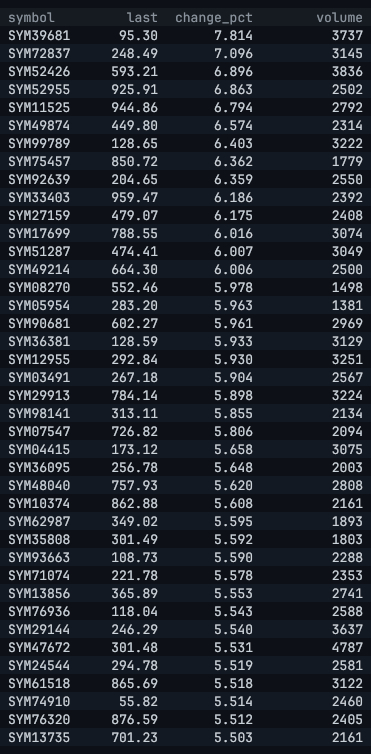
A live table of instruments sorted by percent change, descending
0 allocations per frame in densa
1 draw call per frame
The live example: 100,000 instruments updated continuously, a view sorted by change kept in order as prices move.
Live views
Live

Sorted, filtered and aggregated, updated with each change

Data format
Arrow

Shared, never copied, from the source to the screen

Allocations per frame
0

Proven by tests with a counting allocator

Draw calls per frame
1

Every rectangle and glyph, batched

Built for

Software where every pixel carries data

densa targets screens that are full of numbers and text that change many times a second, and must stay smooth while they do.

  • Example included

    Trading terminals

    Watchlists, order books and blotters with thousands of instruments updating at once. The trading-demo example shows the full pipeline.

  • Monitoring consoles

    Fleets of sensors, servers or services, each a row that never stops changing.

  • Operational dashboards

    Dense tables and readouts that must stay readable at full refresh rate.

  • Developer tools

    Profilers, log viewers and inspectors that show more data than fits on screen.

Today

What you can do with densa

Everything below works now. Each item is an example in the repository: clone it and run the command.

  1. Stream prices into a grid

    A worker thread ticks thousands of instruments; the screen shows the newest snapshot every frame, with changed cells flashing.

    cargo run --release -p trading-demo
  2. Keep a live table sorted

    Rows upserted by key while a filtered "top movers" view stays in order, updated incrementally rather than re-sorted.

    cargo run --release -p densa-arrow --example live
  3. Scroll a million-row Arrow table

    Record batches shown as they are, never copied, with new batches appended while the table is on screen.

    cargo run --release -p densa-arrow --example table -- --live
  4. Arrange a docking workspace

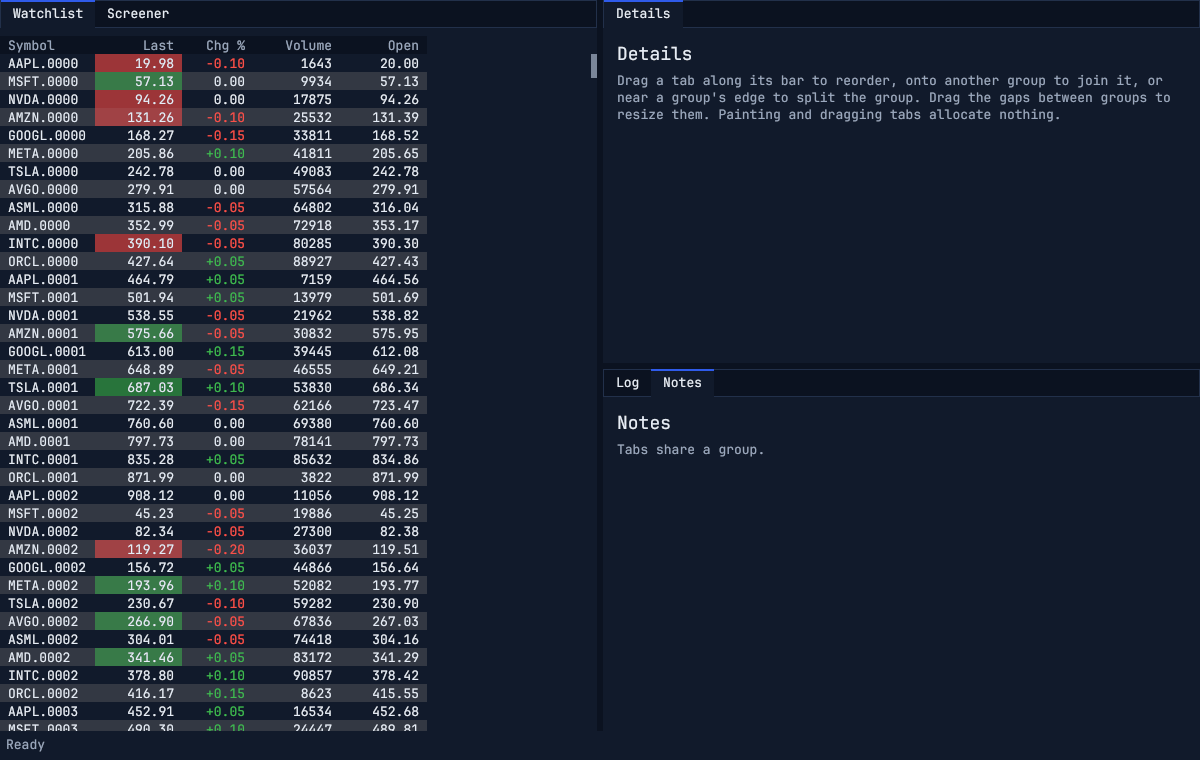
    Panels in tab groups around a live watchlist grid: drag tabs to join or split groups, click a column title to sort, a row to select it.

    cargo run --release -p densa-widgets --example dock
  5. Build tool windows

    Toolbars, filters, buttons, scrolling lists and splitters, laid out with flexbox, with Tab between controls and dark and light themes.

    cargo run --release -p densa-widgets --example gallery
  6. Edit and select text

    Shaped, wrapped, bidirectional text: click, drag and keyboard selection, word motions, and input-method composition shown in place.

    cargo run --release -p densa-paragraph --example editor

Architecture

Independent crates in three lanes. Use only what you need.

Data flows from Arrow sources through live tables into the grid; a tree of widgets, laid out with flexbox, draws into a display list that is independent of any GPU API; the runtime crates hand data between threads and prove that frames never allocate. Only densa-render and densa-window touch the GPU or a window, and no third-party types appear in densa's APIs beyond Arrow's.

Crate reference →
densa's crates in three lanes: data (Arrow sources, densa-data, densa-arrow), interface (densa-grid, densa-widgets, densa-paragraph, densa-ui, densa-text, densa-draw, densa-render, densa-window, the GPU) and runtime (densa-sync, densa-platform, densa-fmt, densa-alloc), all on densa-core

Features

From the data stream to the pixel

Live tables

Upsert Arrow record batches by key. Views sort and filter the rows, groups aggregate them, and both follow every change incrementally instead of being recomputed.

  • Batches are kept as they arrive, shared rather than copied
  • Filters follow SQL's three-valued logic: comparisons with null are unknown
  • Reading a view never allocates; the grid shows it directly
  • Grouped count, sum, min, max and mean, exact for integers and decimals
  • Model-based tests check every view and group against a full recomputation
movers.rs
use densa_data::{
    Aggregate, CompareOp, Filter, GroupSpec, LiveTable, Order, Scalar, ViewSpec,
};

let mut table = LiveTable::new(schema, "symbol")?;
let movers = table.add_view(
    ViewSpec::new()
        .filter(Filter::compare("volume", CompareOp::Gt, Scalar::Int(1_000)))
        .sort_by("change_pct", Order::Descending),
)?;
let sectors = table.add_groups(
    GroupSpec::new().group_by("sector").aggregate(Aggregate::sum("volume")),
)?;

table.upsert(ticks)?;      // new symbols insert, known ones update
table.delete(&delisted)?;  // an array of keys

let view = table.view(movers).unwrap();  // in order, after every change
let totals = table.groups(sectors).unwrap().to_batch()?;  // one row per sector

Widgets

A retained tree of widgets, laid out with flexbox, that takes pointer, keyboard and input method events. It runs without a window, so an interface is built, driven and tested headless.

  • Labels, buttons, text inputs, scroll views, splitters, panels and docking
  • Screen readers read every widget and press, type and scroll through them
  • Pointer capture, hover, focus on click and Tab order
  • Dark and light themes from one set of colors and sizes
  • Painting and event delivery allocate nothing, proven by tests
A docking workspace: a watchlist beside a details pane above log and notes tabs, with a dragged tab's drop preview over the right half of the log and notes group
The dock example: tab groups, with a tab being dragged beside a group.

Rendering

A Canvas batches every rectangle and glyph of a frame into one instanced draw call. The data grid reads cells straight from your own data, so there is no model to copy into.

  • Implement GridSource for your data; the grid asks for visible cells only
  • Cells format into a stack buffer: drawing a frame allocates nothing
  • Glyph atlas grows a page at a time, capped to the GPU's texture limit
  • Pixel output verified in tests by rendering offscreen and reading it back
sensors.rs
use densa_fmt::write_fixed;
use densa_grid::{CellStyle, CellText, Color, GridSource};
use std::fmt::Write as _;

/// A monitoring table: one row per sensor.
struct Sensors<'a> {
    names: &'a [&'a str],
    celsius: &'a [f64],
}

impl GridSource for Sensors<'_> {
    fn rows(&self) -> usize {
        self.celsius.len()
    }

    // Called for every visible cell, every frame.
    fn cell(&self, row: usize, column: usize, text: &mut CellText) -> CellStyle {
        let value = self.celsius[row];
        if column == 0 {
            let _ = text.write_str(self.names[row]);
        } else {
            let _ = write_fixed(text, value, 1);
        }
        let hex = if value > 80.0 { 0xF87171 } else { 0xE2E8F0 };
        CellStyle { color: Color::srgb(hex), background: None }
    }
}

Text

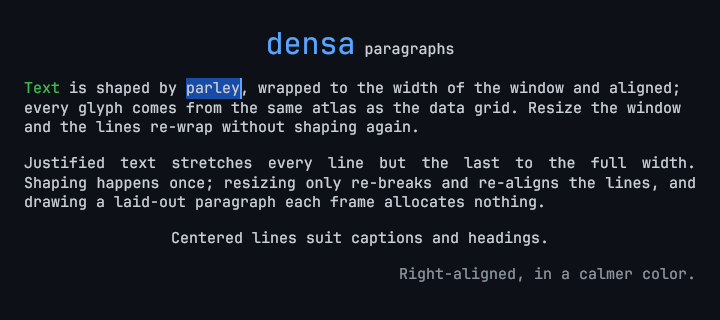
Paragraphs are shaped with parley, wrapped and aligned, and share one glyph atlas with the grid. Changing the width re-wraps without reshaping.

  • Bidirectional text, colored and sized spans, six alignments including justify
  • Click-to-caret, drag, word and line selection, keyboard navigation
  • Editing with input methods (IME): preedit shown in place, candidates beside it
  • Arrow keys move in screen order, deletion in text order: right-to-left text behaves
  • Bundled JetBrains Mono, with the system's fonts for Korean, Japanese, Chinese and more
Wrapped, justified, centered and right-aligned paragraphs with the word parley selected
The paragraphs example: wrapping, four alignments and a selection.

Data hand-off

A producer thread publishes the latest data; the UI thread picks up the newest snapshot once per frame. Neither waits for the other.

  • Wait-free on both sides: one atomic swap to publish, one to read
  • Every memory ordering weaker than the one used fails the loom model
  • Unsafe code checked under Miri; slots on separate cache lines
  • Thread pinning and priority for the producer on hybrid CPUs (Windows)
handoff.rs
use densa_sync::triple_buffer;

let (mut writer, mut reader) = triple_buffer([0.0_f64; 64]);

// Producer thread: fill the back slot, then publish it.
std::thread::spawn(move || {
    writer.write(|rows| rows[0] = 101.25);
    writer.publish();
});

// UI thread, once per frame: switch to the newest snapshot.
if reader.update() {
    reader.read(|rows| draw(rows));
}

Engineering

Guarantees are tests, not promises

Each guarantee below is a test or a check in the repository, run in CI on Linux, macOS and Windows.

No allocation per frame

Drawing the grid, drawing paragraphs, hit-testing and moving a selection run under a counting allocator; any heap operation fails the test.

No locks between threads

The triple buffer is model-checked with loom, and a mutation script proves every weaker atomic ordering is caught.

Correct pixels

GPU tests render offscreen and read the pixels back, including the atlas as it grows and evicts (on machines with a GPU).

Sound unsafe code

Every unsafe block carries a safety comment, enforced by Clippy, and the concurrency and allocator crates run under Miri.

Bounded memory

Glyph memory has a hard limit (4 MiB by default). When full, the least recently used glyphs are reused, never one drawn in the current frame.

Exact live views

A model-based test checks every view against a full recomputation after each of thousands of random upserts, deletes and compactions.

Get started

Run the examples in a minute

You need Rust 1.90 or later and a GPU with Vulkan, DX12 or Metal.

densa is 0.x and experimental: APIs will change between releases.

terminal
git clone https://github.com/densa-rs/densa
cd densa
cargo run --release -p densa-arrow --example live   # a live, sorted table
cargo run --release -p trading-demo                 # a streaming market grid

Roadmap

What exists today, and what comes next

densa is growing from proven foundations toward a complete toolkit for desktop applications. Nothing in the Planned column is available yet. The long-term plan is on the vision page.

Available

  • GPU canvas and data grid (wgpu)
  • Paragraph layout, selection, keyboard navigation
  • Korean, Japanese and Chinese text through the system's fonts
  • Text editing with input methods (IME)
  • Widget tree with flexbox layout, events, focus and Tab order
  • Buttons, text inputs, scroll views, splitters, panels
  • Docking: tab groups rearranged by dragging tabs
  • The data grid as a widget: scrolling, selection, sorting, frozen columns
  • Accessibility: screen readers on Windows, macOS and Linux (AccessKit)
  • Apache Arrow tables: millions of rows, appended live
  • Live tables: keyed upserts, sorted and filtered views kept up to date
  • Grouped aggregates that follow every change
  • Glyph atlas with bounded memory
  • Wait-free data hand-off between threads
  • CPU pinning and thread priority (Windows)

Planned

  • Next: live tables in the grid widget, and GPU charts (time series, candlesticks, volume)
  • Connectors: Parquet, CSV, WebSocket and Arrow Flight
  • Saved docking layouts, floating panels and menus
  • Undo, redo and clipboard for text editing
  • Time windows in live tables
  • Pinning and priority on Linux and macOS

Build interfaces that keep up with your data.

Open source under MIT or Apache-2.0.